Reverse engineering the web for your own needs

Kyle Austad
2026-09-26
More often than not, enterprise software that fills a specific niche dominates the market and thus becomes relatively complacent in feature addition or tech growth. This is true in many verticals however in pest control, especially door-to-door pest control, none is more true than that of FieldRoutes. They offer an API, but restrict API keys to request only, which is completely counterintuitive to how a modern API should work.
What if my API key is leaked somewhere or an employee that no longer works at the company has access to it?
Request a new key from support.
What if I would like to separate API keys with specific scopes or have a key for individual applications so when I am done using a certain 3rd party app or integration I can revoke that key without ruining all my other integrations?
Request a new key from support. Also, no multiple or scoped keys.
Mind boggling. Not only is this against security best practices, but it actively discourages developers from expanding on your platform and creating more value than you currently offer.
The need for reverse engineering
A need arose, that FieldRoutes API could not solve. What if we want to query simple statistics within a company without that company needing to provide entire, unscoped and insecure access to us via their API key?
The solution to that need, reverse engineer their early 2000's feeling PHP frontend.
Reverse Engineering the Web
I made a scraper that takes the needed credentials and retrieves a users statistics from FieldRoutes such as number of sales, doors knocked, pin totals, etc. You can find it here. That repo is not maintained in anyway and originally was going to be a demo for various scrapers and such but is abandoned basically. However the code for scraping a users pins still works.
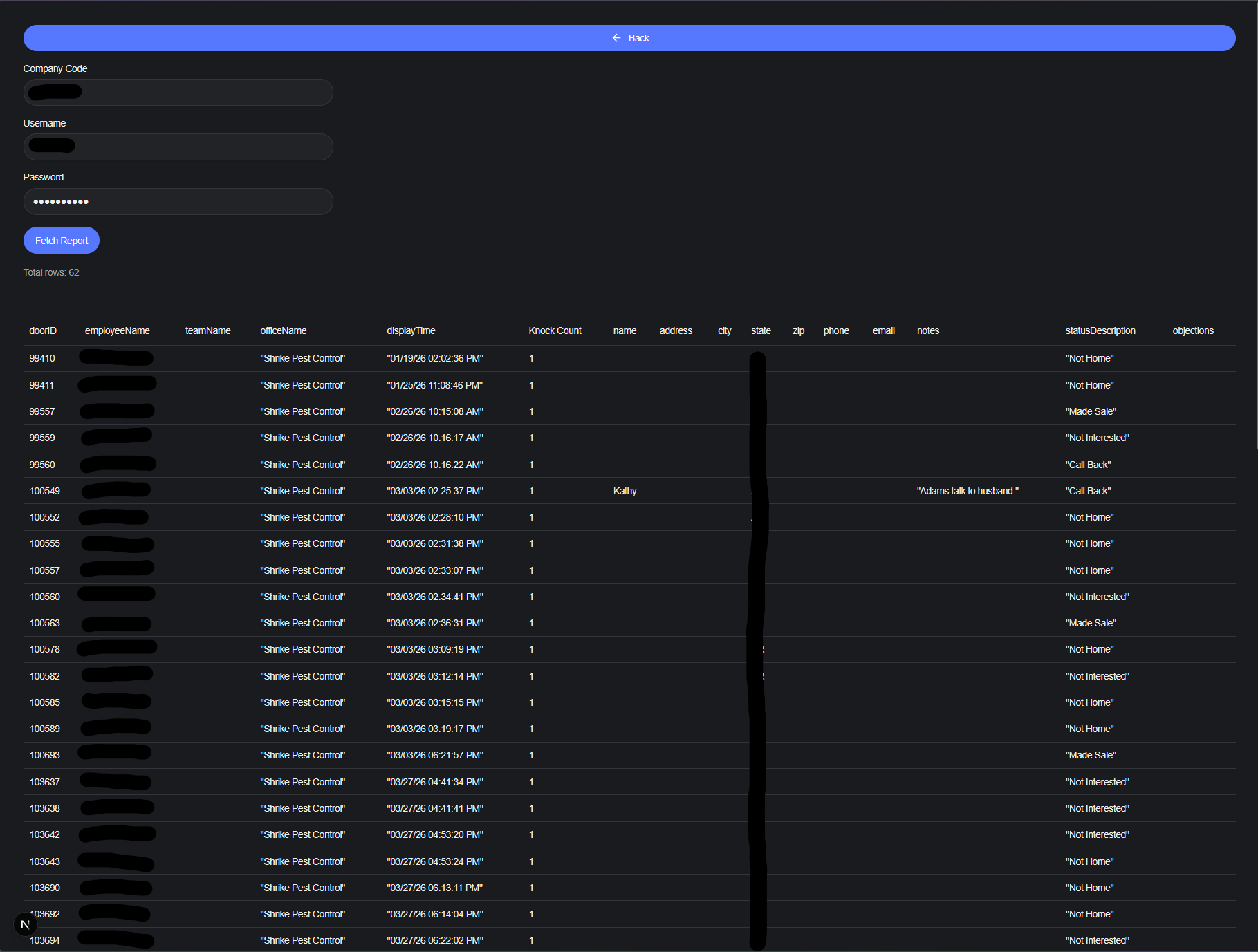
I wanted to look at the web as a whole as well. Reverse engineering a website to access backend information in your own app or tool is always useful, although propably against terms for a lot of places.
The beautiful thing about the web as a platform though, is that it is extremely open. Lots of stuff has moved to SSR or hybrid rendering but information and data still have to get sent to the client, and we can exploit that. For anyone that doesn't know, the web largely works on a simple model of Request/Response i.e. you send a request to a server, based on the structure and type of request, the server sends a response. For example, when you visit a website in a browser, generally speaking, you and your browser send a GET request, and the server hosting that website sends a response containing the HTML, CSS, and JavaScript back which your browser then renders for you to see.
With that simple knowledge, lets set out to reverse engineer the FieldRoutes portal once again, using my old but working code as a guide, but this time... in Rust... Which I am bad at.
Let the games begin
So to get started, I created a new Cargo project with cargo new pestroutes-scraper and immediately added the following to my Cargo.toml:
Cargo.toml1[dependencies]
2reqwest = { version = "0.13.5", features = ["json", "form", "cookies"]}
3tokio = { version = "1", features = ["full"] }
4
since I know I'll be needing to make plenty of HTTP requests and be able to handle the json bodies and form data that FieldRoutes uses. Cookies as well to be able to gather some necessary information from the authentication process. I added tokio to allow async requests and easily make my main function async since I'm just going to throw all this in main for this exercise.
Speaking of which, let's look at how the reverse engineering the original scraper went down. When looking to take a website or web frontend, and utilize its functionality in a different way, your best friend in the whole wide world is the browsers Developer Tools (F12). I also like to turn on "Persist Logs" in the Network tab so that when attempting to trace a data flow across various pages, I can analyze the requests without them clearing before hand.
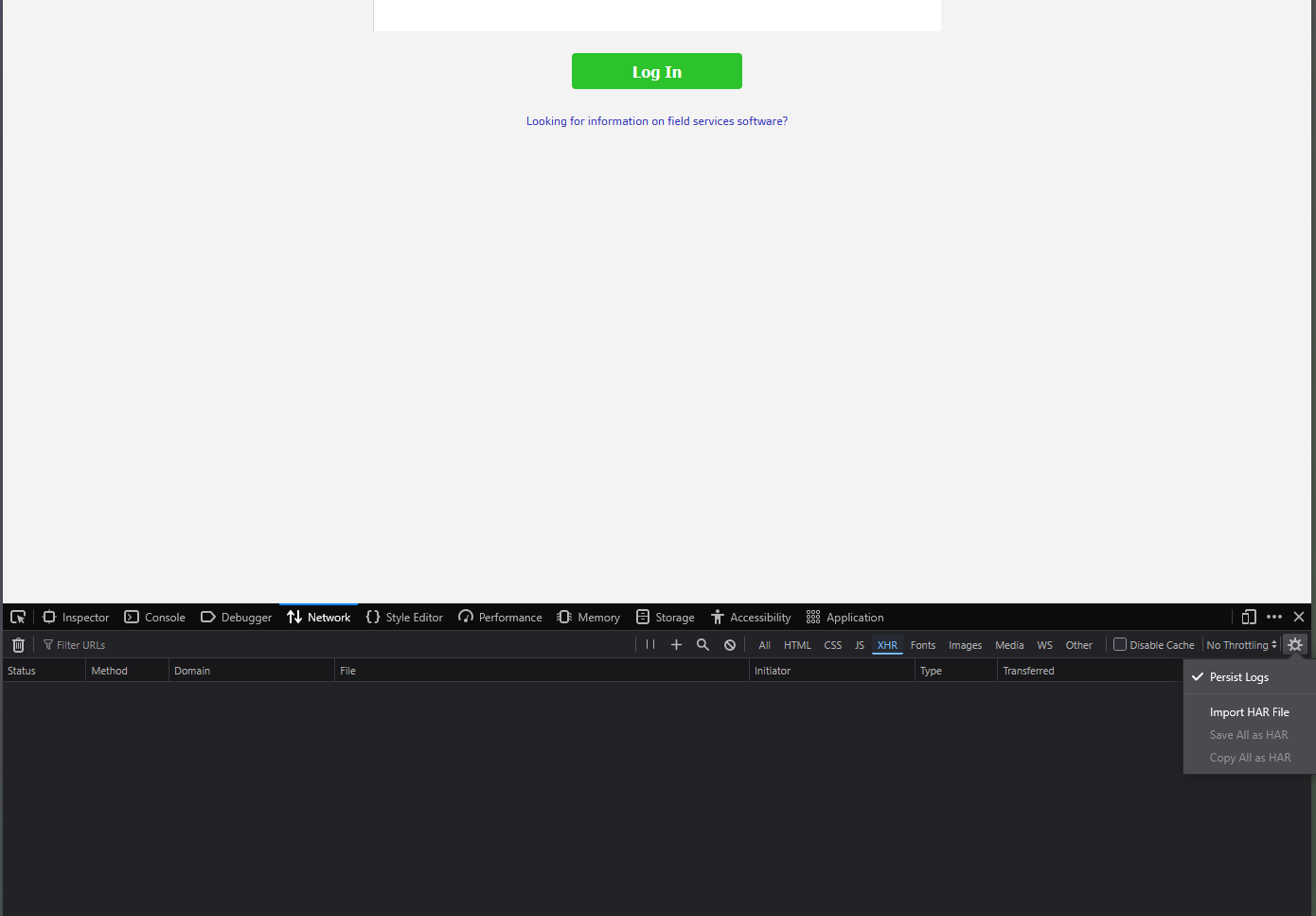
Ok so lets, send a request. You basically want to use the website like normal, and then look at the Network tab of your dev-tools to identify XHR requests that could help you recreate functionality in your own project. Apparently XHR stands for XMLHttpRequest which is a browser API that doesn't necessarily have to use XML in any way, but it's exactly what we care about here since we don't care much for media requests like images or logos, or CSS etc.
So let's login and see what we see:
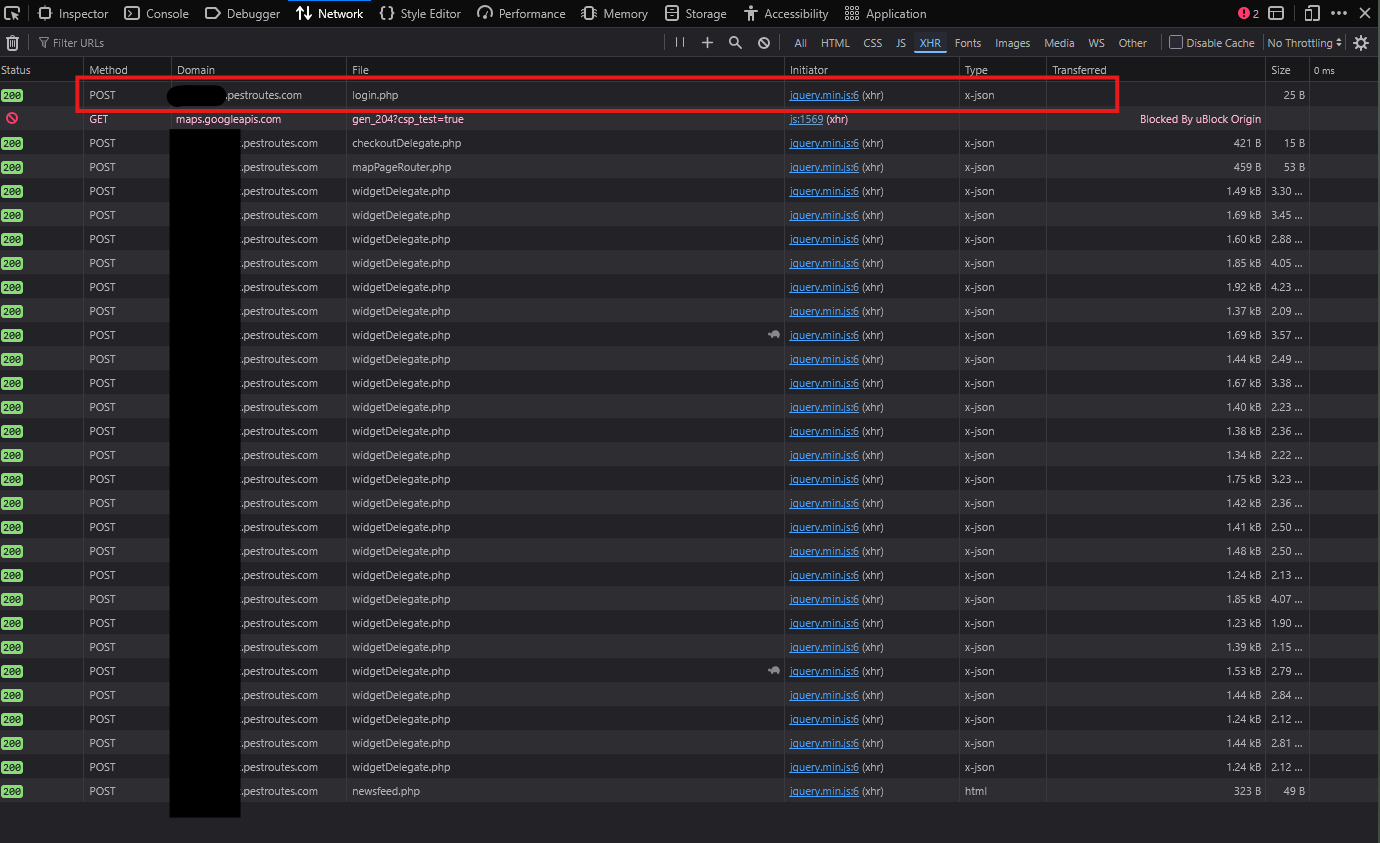
Immediately our Network tab goes ballistic with requests. The goal here is to identify which of these requests will aid us in scraping a user's pin data, and for that we need authentication and authorization. Luckily, the authorization comes from the user credentials. They already have permission to view their own knocking reports and pin data on the web portal, and without an API key. So we just need to worry about authentication. Taking those credentials, and turning them into usable data that will allow our app the authorization to act as if that user was simply using the web portal. For that, the first request after hitting the login button is what we want.
We can see it was a POST request to the same domain we are logging in on. The File column can generally be understood to be the path on the domain, in this case login.php would equate to https://ourdomain.pestroutes.com/login.php . This also tells us that the web portal is served via PHP. If we click on that request, we get a ton of information. We can see the headers, cookies, the request and response bodies and more. We can also see the full URL for our POST request which actually has the filename /resources/session/login.php . If we look at the request body, we can also get the first look at the shape of the data we need to mimic. It consists of Form Data with a username, company, password, and redirect field.
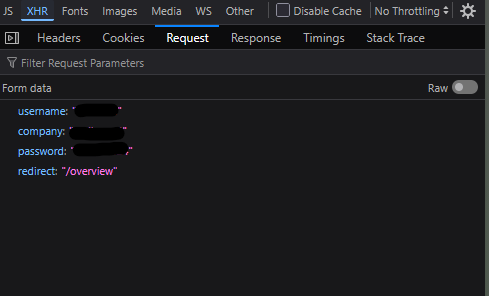
Looking at the Cookies for the request we can also see there is a cookie attached to the response called redirect. In my original TypeScript code for the scraper, I basically checked if the response to the login endpoint returned that cookie, if not it failed. In that code I also used the tough-cookie and fetch-cookie to store response cookies when using the fetch API in Node so I didn't have to handle them myself. So let's see how Reqwest can handle cookies.
I'm going to start by tightly mimicking the function flow in my original code, but in Rust. Lets start by using read_line to get the information from the user we need to reconstruct the request for logging in.
main.rs1use reqwest::Client;
2use std::io::{self, Write};
3
4#[tokio::main]
5async fn main() {
6    let mut company_code = String::new();
7    let mut username = String::new();
8    let mut password = String::new();
9
10    // COMPANY CODE INPUT
11    print!("Enter your company code: ");
12    io::stdout().flush().expect("Unable to ensure the prompt flushed before awaiting input");
13
14    io::stdin().read_line(&mut company_code).expect("Oopsie something went wrong inputting your company code.");
15
16    let cleaned_company_code = company_code.trim();
17
18    // USERNAME INPUT
19    print!("Enter your Username: ");
20    io::stdout().flush().expect("Unable to ensure the prompt flushed before awaiting input");
21
22    io::stdin().read_line(&mut username).expect("Something went wrong inputting your username.");
23
24    let cleaned_username = username.trim();
25
26    // PASSWORD INPUT
27    print!("Enter your Password: ");
28    io::stdout().flush().expect("Unable to ensure the prompt flushed before awaiting input");
29
30    io::stdin().read_line(&mut password).expect("Something went wrong inputting your password");
31
32    let cleaned_password = password.trim();
33
34}
Some really basic stuff here, just getting the company code, username and password with some dirty .expect() usage to handle any errors but it should get the job done. We also ensure we trim any whitespace or new line characters from read_line and provide the variables as cleaned_... now lets use them to re-create the login request.
main.rs1const REDIRECT: &str = "/resources/delegates/day/appointmentDelegate?action=getAppointmentData";
2
3// HTTP Stuff
4    let client = Client::builder().cookie_store(true).build().expect("Error building Reqwest client");
5    let login_body = [("username", cleaned_username), ("password", cleaned_password), ("company", cleaned_company_code), ("redirect", REDIRECT)];
6    let base_url = format!("https://{}.pestroutes.com", &cleaned_company_code);
I took some liberties adding the const REDIRECT at the top of the file with the path I discovered in my original sluething across the PestRoutes web portal. This gets us an HTTP client ready to use, the array of tuples to use as our form body for the Reqwest .form() method, and a base URL with the scheme we can use based on the company code. We also use Client::builder() instead of just Client::new() so we can enable the cookie_store .
Next lets add the regex crate to our Cargo.toml using cargo add regex so we can use regex to parse some HTML from certain endpoints. So our Cargo.toml now looks like this:
Cargo.toml1[dependencies]
2regex = "1.13.1"
3reqwest = { version = "0.13.5", features = ["json", "form", "cookies"]}
4tokio = { version = "1", features = ["full"] }
Upon examining the XHR requests and responses from the sales report button click in FieldRoutes I was able to see that the form data sent with the request requires an employee ID, however the employee ID is not stored in a cookie, or sent with a response on logging in, so we have to basically rip it from some HTML that has it baked in. So first lets get our login handled in Rust so cookies that are needed get stored in our Reqwest cookie store. Also notice I am using an underscore before the login_response variable name. This is because we actually don't care about the response itself and won't use that variable, we just want the client to get the cookies for future requests and prefixing it with an underscore avoides an unused_variables warning from rustc
main.rs1let _login_response = client
2        .post(format!("{}/resources/session/login.php", base_url))
3        .form(&login_body)
4        .header("Content-Type", "application/x-www-form-urlencoded; charset=UTF-8")
5        .header("X-Requested-With", "XMLHttpRequest")
6        .header("Origin", &base_url)
7        .header("Referer", &base_url)
8        .send()
9        .await
10        .expect("Error in login request");
Next lets get the sales page HTML and make it text we can use regex on. I am using a Rust feature here called shadowing. It lets you re-declare a variable with the same name while changing its data type. Even though variables are immutable by default in Rust this allows us to avoid over-complicated variable declaration while still allocating a new variable in memory, but we can just use the same variable name even though the type changes.
main.rs1let sales_html = client
2    .get(format!("{}/sales", base_url))
3    .header("User-Agent", "Mozilla/5.0")
4    .send()
5    .await
6    .expect("Error requesting sales page");
7
8let sales_html = sales_html
9    .text()
10    .await
11    .expect("Error reading sales page");
And finally lets setup our regular expression and capture the visitor ID and employee ID from the sales_html and print it to see how we are doing.
main.rs1let pendo_regex = regex::Regex::new(
2        r#"pendo\.initialize\(\s*\{\s*visitor:\s*\{\s*id:\s*"([^"]+)""#,
3    )
4    .expect("Invalid Pendo regex");
5
6let captures = pendo_regex
7        .captures(&sales_html)
8        .expect("Could not find Pendo visitor ID");
9
10let visitor_id = captures
11        .get(1)
12        .expect("Pendo visitor ID capture missing")
13        .as_str();
14
15let employee_id = visitor_id
16        .split('-')
17        .nth(1)
18        .expect("Pendo visitor ID did not contain expected '-' separator");
19
20println!("Pendo visitor ID: {}", visitor_id);
21println!("Employee ID: {}", employee_id);
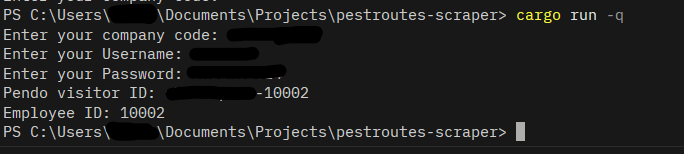
If we run our script using cargo run and type in valid credentials we get a visitor ID, which is used to get our employee ID logged to the console. Yay!
Alright, so now we have the information needed to build our form body for the final request we need to make to get the knocking report. We want to simulate the "Export to CSV" button being clicked on the FieldRoutes web portal so it will respond with a CSV file we can just save to disk.

To do that, our form data on the next request will be built like this:
main.rs1let report_form = [
2    ("dateRange-officeParams", "01/01/2026 - 12/31/2026"),
3    ("persistedDateRange", "01/01/2026-12/31/2026"),
4    ("employees", employee_id),
5    ("officeIDs", "1"),
6    ("advanceToggle", "false"),
7    ("sortColumn", "doorID"),
8    ("sortDirection", "asc"),
9    ("action", "exportReport")
10];
I am hardcoding some dates I know have data, and I know the office ID for the company and office I am accessing is 1. The sorting options will just sort by the ID of the pin in ascending order, and the action tells the PHP endpoint we are wanting the CSV export. Now lets make the request and save the response to a file in the current working directory.
main.rs1    let report_response = client
2        .post(format!("{}/resources/routers/doorRouter", base_url))
3        .form(&report_form)
4        .header("User-Agent", "Mozilla/5.0")
5        .header("Content-Type", "application/x-www-form-urlencoded")
6        .send()
7        .await
8        .expect("Error getting sales report CSV");
9
10    // convert csv response to text to save to file
11    let sales_report = report_response
12        .bytes()
13        .await
14        .expect("Error reading sales report response");
15
16    std::fs::write("report.csv", &sales_report).expect("Error writing sales report to file");
17
18    println!("You should have a 'reports.csv' file in the current working directory with your knocking data!")
If we cargo run our project and input valid credentials, we successfully get the report.csv file saved to the current working directory, full of data we acquired to tricking the FieldRoutes frontend into thinking we were it.
In conclusion...
Recreating this script illustrates the process for almost all web frontends. Examine requests and responses across the data flow you want to extract, see what data is needed to recreate those requests and parse the responses, and then find a way to get that data. This can usually be done through cookies, local storage, or as we saw here, extracting data from raw HTML responses.
FieldRoutes should really change the way their API works. It's dumb. But until they do, I'll enjoy finding creative ways to get the information I need for the projects I want to build without waiting on others to create a way.
I want to apply these principles to other websites and see what I can build. The process as a whole is extremely rewarding, to basically figure out how a website or web app is functioning, re-create that flow, and then use the data in the way you want. Please tell me how bad my Rust code is. I know I didn't gracefully or truly handle errors but for a one-off script, it does alright and functions as intended provided you have valid credentials.
Thanks for coming to my TED talk.